
If you manage Starlink connectivity across dozens or hundreds of enterprise locations, you know how difficult it can be to predict what each site will use. One month, a location may use very little data. The next, its needs can change significantly.
That leaves you with a choice: provision every site for peak demand and risk paying for data you don’t use, or provision more conservatively and worry about overages and unpredictable costs.
We built the WEI Connect customer portal to give you a better way to manage that balance. The recently refreshed portal brings Starlink usage, performance, device health, and support into one place, giving you a clearer view of what is happening across your locations and the information to make better decisions about the data you’re using.
The portal was designed and developed by WEI based on what we’ve learned planning, deploying, and supporting enterprise Starlink environments. The goal is simple: give you the visibility to understand what’s happening, the tools to act, and access help when you need it.
For a brief walkthrough, watch the short walkthrough:
Starlink provides the underlying connectivity technology. WEI adds the operational layer enterprises need around it:
- Warehousing and inventory
- Deployment services
- 24/7 IT support
- Centralized telemetry and monitoring
- Pooled data plan designed for distributed environments
The refreshed WEI Connect customer portal brings those capabilities into a single operational view. And one of its most important capabilities is making pooled data visible and manageable across the enterprise.
Make Your Pooled Data Plan Easier to Manage
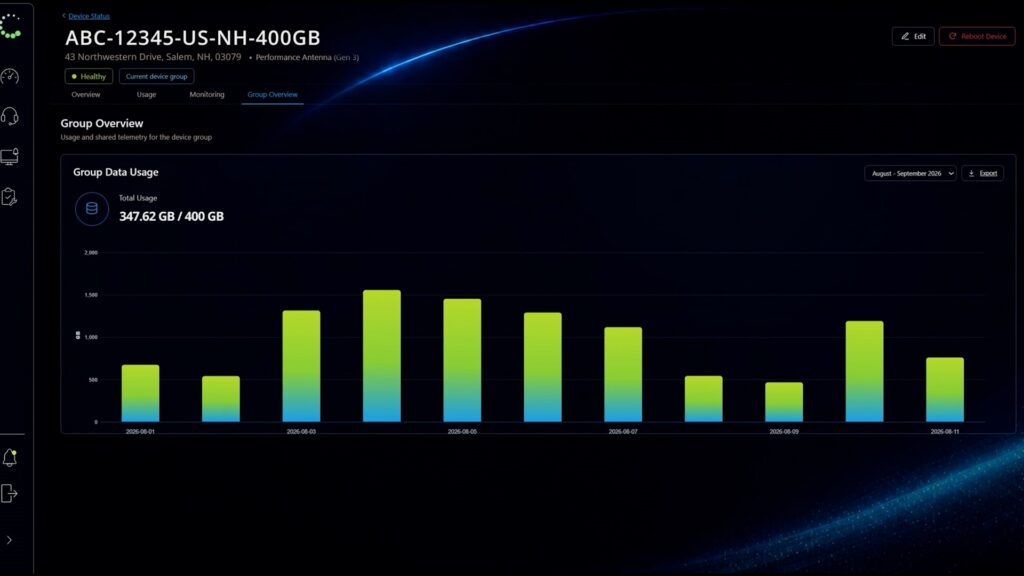
Click image to enlarge: WEI Pooled Data Plan Dashboard
For a large distributed organization, a pooled data plan changes the economics of managing Starlink. Instead of treating every location as an isolated data plan, WEI Connect can provide a pooled data plan that allows consumption to be managed across the broader Starlink footprint. The portal then puts individual-site consumption and total pooled usage together in one view.
This distinction matters!
For example, imagine an enterprise with 100 locations. Some sites are consistently light users. Others fluctuate because of seasonality, business activity, backup events, or temporary operational requirements. If every location is provisioned independently for its potential high-water mark, the organization can end up paying for substantial amounts of data it never consumes.
A pooled data plan allows the enterprise to look at consumption across the portfolio instead. Now, the WEI Connect portal makes that model visible. IT can see which locations are consuming data, how individual sites are affecting the shared pool, how usage changes between billing periods, and where an unusual spike may require attention.
Customers can also export usage by site and configure notifications around selected usage thresholds. Instead of waiting for a bill to reveal a change in consumption, IT has the information to understand it as it happens.
Manage Starlink as Part of the Enterprise WAN
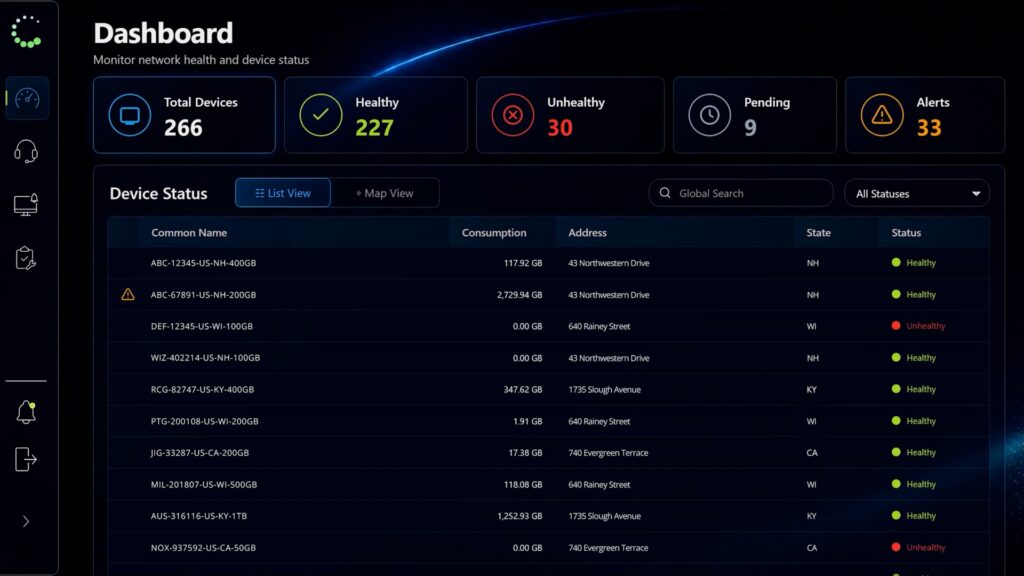
Click image to enlarge: WEI Connect Device Dashboard
Starlink may serve as a primary connection, a backup, or a way to reach locations where traditional service is unavailable. Whatever role it plays, IT still needs to manage it as part of the broader WAN. WEI Connect opens with the full Starlink footprint, including device health, pending installations, and active alerts. Customers can filter locations and open any site for usage history and device details instead of gathering that information site by site.
Find the Context Behind a Performance Change
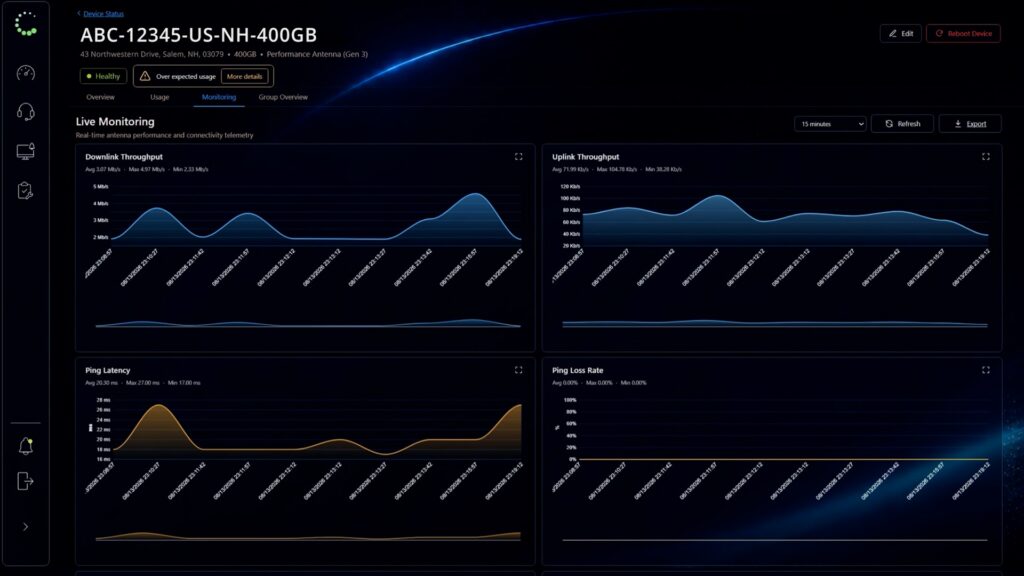
Click image to enlarge: WEI Connect Performance Dashboard
When a site slows down, knowing that performance changed is not enough. WEI Connect shows throughput, latency, dropped packets, signal quality, and possible obstructions over periods ranging from 15 minutes to 30 days. That gives IT a better starting point for determining whether the change lines up with cabling, service conditions, weather, or a physical obstruction.
Customers can also create notifications for offline devices, sustained latency, dropped traffic, and selected site or pool usage thresholds. The right people receive an email when a condition occurs, so no one must watch the dashboard all day.
Keep Installation Records and Support Close
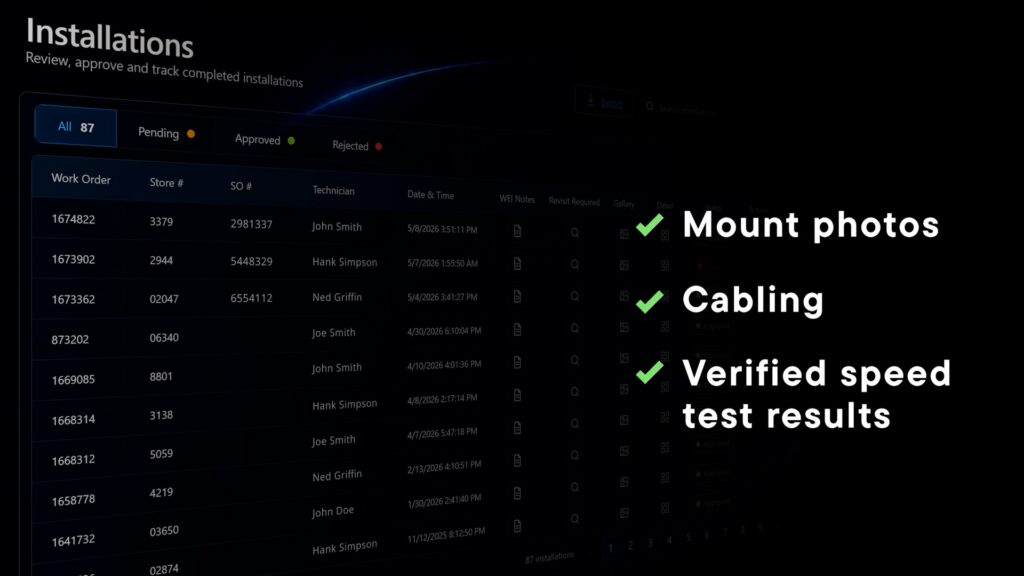
Click image to enlarge: WEI Connect Device Installation Dashboard
The physical installation still matters after a site comes online. WEI Connect can preserve photographs of the mount, power supply, cabling, and equipment connection, along with alignment details and verified speed-test results. If a question comes up later, the team has a documented starting point.
Customers can then submit a ticket through the same portal to our 24/7 support team. Monitoring, installation evidence, self-service actions, ticketing, and expert support work together instead of living in separate places.
Give IT Teams Their Time Back
I believe a useful portal should do more than display information. It should remove steps from the customer’s day. Authorized users can rename a device, update its service address, reboot it remotely, and export daily usage without first opening a support ticket.
Those routine tasks add up across a large deployment. Giving customers direct access reduces administrative work and allows our 24/7 support team to focus on issues where its expertise matters most.
See What Changes When It All Comes Together
We built the WEI Connect portal to give customers something that is difficult to appreciate until you see it: a single view of the information needed to operate Starlink across an enterprise.
That is why one of my favorite parts of introducing WEI Connect to a customer is showing them the portal for the first time.
The reaction is consistently positive, particularly when we get to the pooled data dashboard. People immediately see the difference between managing individual connections and managing connectivity as an enterprise resource. They can see usage across the entire pool, drill into individual locations, understand performance and device health, set alerts, review installation information, and reach support from the same environment.
That is usually when the larger WEI Connect story clicks, as Starlink provides the connectivity while WEI surrounds it with the warehousing, support, telemetry, monitoring, and pooled consumption model needed to operate it at enterprise scale. And now, this fully customizable portal gives customers one place to see and manage it.
If you are evaluating Starlink as part of your WAN strategy, I encourage you to see the portal for yourself. Request a live WEI Connect portal demonstration at connect.wei.com. You can also reach out to me directly on LinkedIn.